
Punch Walls To Escape Robots: Upgrades, Repair, and Drill-Bot
Last updated:
Robots can help your team carry more in the room-clearing run, while Drill-Bot breaks walls automatically. Here’s how to upgrade and repair room robots and find permanent Drill-Bot access.
Quick Answer
In the room-clearing run, press F at the Robots station to buy SPEED, CARRY, or ROBOTS upgrades that help everyone. To start a repair, approach a robot displaying “Fix robot” and press F. Drill-Bot automatically breaks walls, prioritizes floating blocks, and has a separate permanent purchase.
Robot and Drill-Bot at a Glance
| Assistant | Role |
|---|---|
| Room Robot | Upgrade its speed, carrying capacity, or number at the Robots station. The upgrades help everyone. |
| Drill-Bot | Automatically breaks walls, prioritizes floating blocks, and gets stronger as you upgrade. |
The room Robot’s upgrade prices and repair prompt are separate from Drill-Bot’s permanent purchase.
-
Robot
- Gameplay context
- Room-clearing run
- Upgrade benefit
- Helps everyone (Robots upgrades in the room-clearing run)
-
Drill-Bot
- Function
- Automatically breaks walls for you
- Target priority
- Floating blocks first
- Upgrade growth
- Gets stronger as you upgrade
Buy Robot Upgrades
- Approach the Robots upgrade station during a room-clearing run and press F.
- Choose SPEED, CARRY, or ROBOTS.
- Pay the displayed cash price for the upgrade.
| Upgrade | Change | Cash cost |
|---|---|---|
| ROBOTS | 1 → 2 robots | $1,200 |
| ROBOTS | 2 → 3 robots | $2,500 |
| SPEED | ×1.15 → ×1.30 | $900 |
| CARRY | 24 → 30 voxels | $400 |
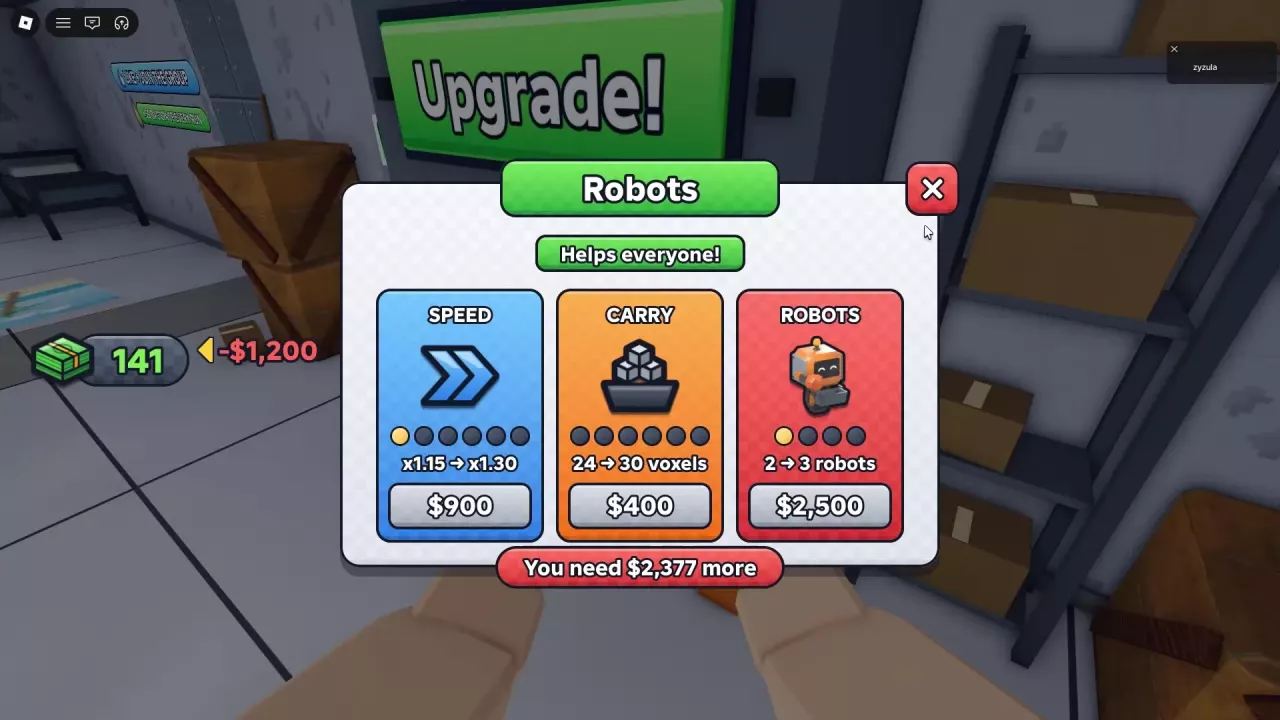
Choose Speed, Carry, or More Robots
- Choose ROBOTS when you want another assisting unit.
- Choose CARRY when you want each robot to carry more voxels at a time.
- Choose SPEED when you want robots to move faster.
Each upgrade helps everyone, so a team can coordinate its spending around the assistance it needs. For other ways to spend cash, see the upgrade guide.
Start a Robot Repair
Approach a robot displaying Fix robot and press F to start the interaction. A progress bar appears during the repair.
Drill-Bot and Permanent Access
Drill-Bot breaks walls for you, targets floating blocks first, and gets stronger as you upgrade. Choose it when you want automatic wall-breaking assistance across runs.
Drill-Bot Forever costs 99 Robux and grants permanent Drill-Bot access. A separate Drill-Bot – Keep Forever offer describes paying the difference to have Drill-Bot join every run; that offer is not for sale. See the game passes guide for the wider selection of permanent benefits.
-
Drill-Bot Forever
- Price
- 99 Robux
- Benefit
- Permanent Drill-Bot access to help with your runs.
-
Drill-Bot – Keep Forever
- Payment
- Pay the difference
- Benefit
- Drill-Bot joins you in every run.
- For sale
- No (At the saved listing date)