Punch Walls To Escape Vacuums: Collection, Upgrades, and Choices

Last updated:

Vacuums collect the loose rubble you create by breaking walls. Choose a collector that suits your run, improve its collection stats, and keep enough bag space available to use it.

Quick Answer

Break the wall first, then equip your Vacuum and aim at the loose rubble. In the room-clearing route, press 2 and hold the mouse button; in the five-layer wall route, select it from your quickbar. Unload a full bag before collecting more. Room-clearing upgrades improve Reach, Suction, and Spread. For the five-layer route, upgrade Backpack capacity first, then consider the $1,000 THIS RUN Turbo Vacuum for faster collection at longer range.

5 objects

Look up rubble collectors, their purchase conditions, and collection features.

Vacuum

Vacuum Cleaner

Location
—
Cash price
—
Offer price
—
Use
Collect loose rubble after breaking walls.
Starting equipment
Start every run with the Vacuum. (With Vacuum Forever)
More details
Type
Rubble collector
Controls
Press 2, aim at rubble, and hold the mouse button. (Room-clearing flow)
Quickbar slot
4 (Demonstrated five-layer wall setup)
Upgrade options
Reach, Suction and Spread through Q or UPGRADES > Vacuum. (Room-clearing flow)
Reach
18 studs (Room-clearing upgrade menu: before the quoted $60 upgrade)
Reach
20 studs (Room-clearing upgrade menu: target of the quoted $60 upgrade)
Upgrade cost
60 cash (Room-clearing flow: Reach 18 to 20 studs)
Suction
28 /s (Room-clearing upgrade menu: before the quoted $250 upgrade)
Suction
38 /s (Room-clearing upgrade menu: target of the quoted $250 upgrade)
Upgrade cost
250 cash (Room-clearing flow: Suction 28/s to 38/s)
Spread
24 degrees (Room-clearing upgrade menu: before the quoted $30 upgrade)
Spread
27 degrees (Room-clearing upgrade menu: target of the quoted $30 upgrade)
Upgrade cost
30 cash (Room-clearing flow: Spread 24 to 27 degrees)
Gear upgrade
Suction can progress through levels 1 and 2 in Upgrades > Gear. (Five-layer wall flow)
Turbo Vacuum

Location
Tool Shop (Five-layer wall flow)
Cash price
1000 cash (THIS RUN)
Offer price
—
Use
—
Starting equipment
—
More details
Type
Rubble collector (Five-layer wall flow)
Suction distance
Nearly twice the regular Vacuum's distance. (Shop description)
Collection speed
More than twice the regular Vacuum's speed. (Shop description)
Breaks red brick walls
No (Direct use of Turbo Vacuum)
Shop recommendation
Upgrade Backpack first.
Collects rubble into
Backpack (Five-layer wall flow)

Mega Vacuum

Location
Tool Shop display pedestal
Cash price
—
Offer price
79 Robux (Shop pedestal offer)
Use
—
Starting equipment
—
More details
Type
Vacuum equipment (Five-layer wall flow)

Golden Hoover

GOLDEN HOOVER

Location
Golden Hoover purchase offer (Room-clearing interface)
Cash price
—
Offer price
149 Robux (Room-clearing interface offer)
Use
—
Starting equipment
—
More details
Type
Vacuum equipment (Room-clearing flow)
Advertised strength
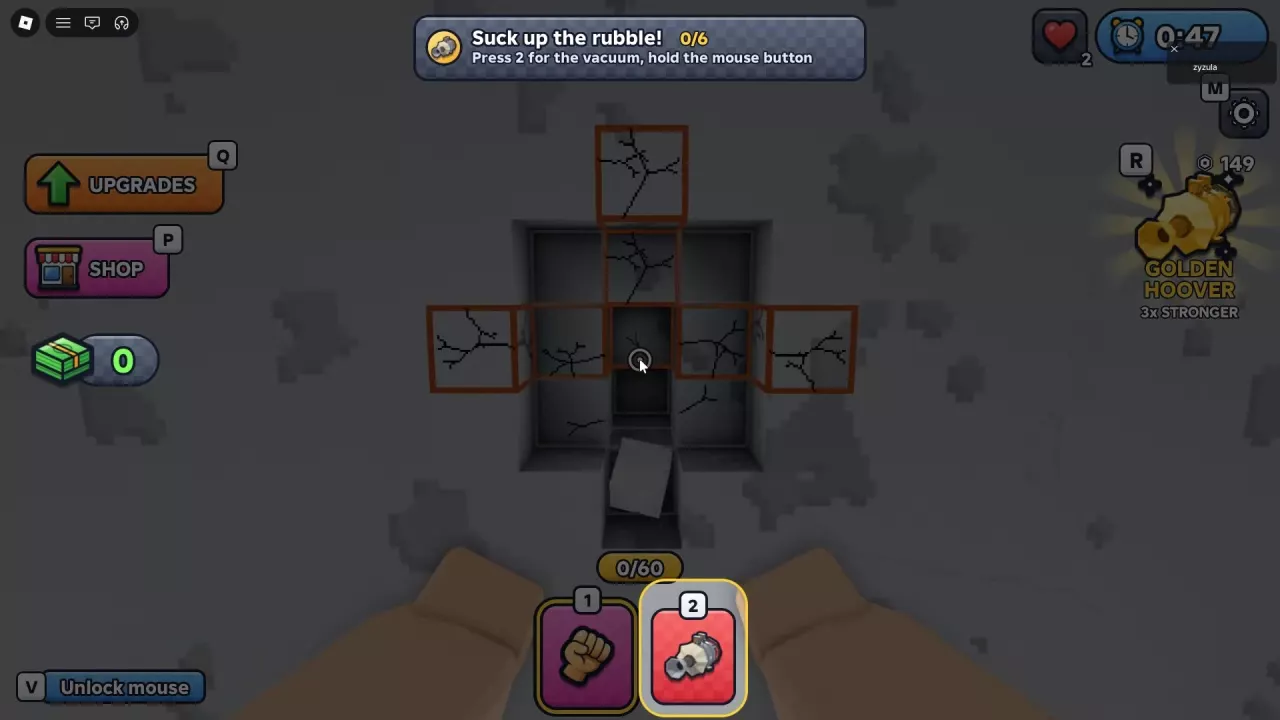
3 × (Offer describes it as '3x STRONGER'; this is not an individual Reach, Suction or Spread specification)

Hose Vac

Location
—
Cash price
—
Offer price
—
Use
Collect loose rubble with the Hose Vac. (Chapter 2: Ironhold)
Starting equipment
Start every Prison run with the Hose Vac. (With Hose Vac Forever)
More details
Type
Vacuum equipment
Chapter
Chapter 2: Ironhold

Vacuum Equipment and Purchase Options

Vacuum, Turbo Vacuum, Mega Vacuum, Golden Hoover, and Hose Vac are distinct equipment options. Match the purchase to the route and offer shown in your game: the five-layer route uses the Tool Shop, while the room-clearing interface includes the Golden Hoover offer.

Turbo Vacuum's cash purchase is labeled THIS RUN. Mega Vacuum's 79 Robux price belongs to its Tool Shop pedestal offer, and Golden Hoover's 149 Robux price belongs to the room-clearing offer. A Robux price alone does not establish a permanent unlock.

For equipment at the start of a run, Vacuum Forever grants a Vacuum every run, while Hose Vac Forever grants a Hose Vac at the start of every Prison run.

  • Vacuum

    Type
    Rubble collector
    Use
    Collect loose rubble after breaking walls.
    Starting equipment
    Start every run with the Vacuum. (With Vacuum Forever)
  • Turbo Vacuum

    Location
    Tool Shop (Five-layer wall flow)
    Cash price
    1000 cash (THIS RUN)
    Suction distance
    Nearly twice the regular Vacuum's distance. (Shop description)
    Collection speed
    More than twice the regular Vacuum's speed. (Shop description)
    Shop recommendation
    Upgrade Backpack first.
  • Mega Vacuum

    Location
    Tool Shop display pedestal
    Display price
    79 Robux (Shop pedestal offer)
  • Golden Hoover

    Location
    Golden Hoover purchase offer (Room-clearing interface)
    Offer price
    149 Robux (Room-clearing interface offer)
    Advertised strength
    3 × (Offer describes it as '3x STRONGER'; this is not an individual Reach, Suction or Spread specification)
  • Hose Vac

    Starting equipment
    Start every Prison run with the Hose Vac. (With Hose Vac Forever)

Collect Loose Rubble with the Vacuum

  1. Break wall blocks with your fists or a wall-breaking tool to create loose rubble.
  2. Equip the Vacuum. In the room-clearing route, press 2. In the five-layer wall route, select the Vacuum from its current quickbar slot.
  3. Aim at the loose pieces. In the room-clearing route, hold the mouse button to pull them into your bag.
  4. Watch the bag counter and unload when it fills.

Turbo Vacuum also collects loose rubble; it cannot directly break the red brick wall. Switch back to a wall-breaking tool when you need to create more rubble.

Vacuum tutorial highlighting quickbar slot 2 and the hold-mouse collection instruction.

When the Vacuum Stops Collecting

Collection needs both loose rubble and available bag space. If nothing is being picked up, aim at detached pieces and check your bag counter. When the bag is full, use the delivery point for your route:

Route or stage How to unload
Five-layer wall route Follow the selling prompt or ground arrows to the Crusher. Approach it and click the machine or press E.
Room-clearing introduction Walk into the green SELL HERE area beneath the wall opening.
Room-clearing conveyor Approach the input and press E at Empty bag onto belt.

A full conveyor can leave blocks in your bag. Those blocks still occupy capacity; the remaining bag count does not mean the Vacuum has failed. Let the belt make room, then unload the remainder.

The room-clearing full-bag prompt can also direct you to sell to your cellmate. For processing and selling details, see how to sell rubble.

Reach, Suction, and Spread

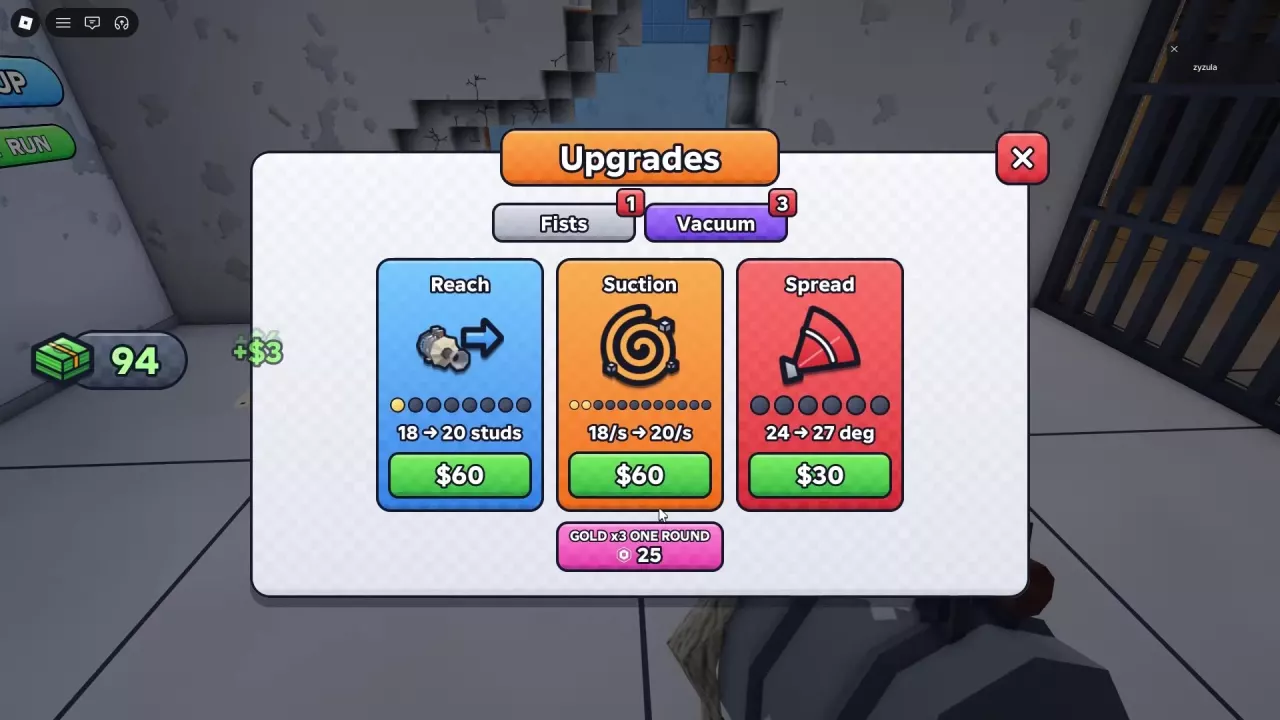
In the room-clearing route, press Q or click UPGRADES, select Vacuum, and buy the attribute you want with cash.

Attribute What it improves Upgrade values Cash cost
Reach Collection distance 18 → 20 studs $60
Suction Collection rate 28/s → 38/s $250
Spread Collection angle 24° → 27° $30

These prices apply to the listed transitions. The Suction row applies after Suction has reached 28/s; earlier upgrades have different values and prices.

Choose Reach when rubble is too far away, Suction when collecting a pile takes too long, or Spread when you want a wider collection angle. If your bag fills before collection speed becomes a problem, spend on capacity first.

In the five-layer wall route, open UPGRADES → Gear for Suction and Vacuum Reach. Suction progresses through levels, including levels 1 and 2. Use that route's menu prices and levels; the room-clearing table above belongs to its separate Vacuum menu.

For spending decisions beyond collection, see upgrade priorities.

Vacuum upgrade menu with Reach, Suction, and Spread, including an earlier Suction upgrade from 18/s to 20/s.

Should You Upgrade to Turbo Vacuum?

Buy Turbo Vacuum when collection speed or reach is slowing your five-layer run and you already have room to carry more rubble. Its shop description promises nearly twice the regular Vacuum's suction distance and more than twice its collection speed, and recommends upgrading your Backpack first.

  • Choose Turbo if rubble piles up while you collect and your upgraded Backpack gives you space to benefit from faster pickup.
  • Keep the regular Vacuum for now if cash is tight or your small Backpack already forces frequent unloading. More collection speed would fill the same bag sooner.

To buy it, open Turbo Vacuum at the Tool Shop, choose $1,000 — THIS RUN, then equip it from your quickbar. This gives you the collection upgrade for that run.

Choose Bag Space and Purchase Duration

Pair collection upgrades with enough carrying space to reduce interruptions. Use the bag capacity and upgrade costs to choose the Backpack upgrade for the five-layer route or the Bag upgrade for the room-clearing route.

For repeat runs, compare the offer's duration as well as its currency. THIS RUN and ONE ROUND purchases cover the current run or round; PERMANENT and the named Forever passes serve longer-term needs. See This Run vs Permanent purchases for menu choices and game pass benefits for starting-equipment perks.

Golden Hoover's “3x STRONGER” wording describes its advertised overall strength. It is not a separate 3× multiplier for each of Reach, Suction, and Spread.