
Punch Walls To Escape: This Run vs Permanent Purchases
Last updated:
Tool and bag menus offer different ways to pay for equipment. Choose by the purchase label, currency, and shop you are using—not just the item name.
Quick Answer
THIS RUN uses in-game cash for the current run. ONE ROUND costs Robux for one round. PERMANENT provides lasting ownership, while individual Forever passes specify equipment access in future runs. ONE TIME is a separate label and should not be treated as PERMANENT. For equipment you only need now, favor an available cash option; for repeated runs, choose an explicitly permanent benefit.
What the Purchase Labels Mean
| Purchase label | Meaning | When to choose it |
|---|---|---|
| THIS RUN | Pay in-game cash to use the item for the current run. | You need equipment now and have enough cash. |
| ONE ROUND | Pay Robux for one round. | You want a single-round purchase using Robux. |
| ONE TIME | A separate Robux purchase option in the five-wall Tool Shop. | Do not select it expecting permanent ownership based on the label alone. |
| PERMANENT | Buy lasting ownership of the offered item. | You want to keep the item for future play. |
| Forever pass | Receive the future-run benefit stated by that specific pass. | You want its stated equipment access, such as starting every Prison run with Pickaxe. |
If your goal is simply to finish the current run, an available cash purchase avoids spending Robux. If you want equipment at the start of later runs, look for a permanent offer whose benefit explicitly includes that access.
Tool Shop Options for Pickaxe, Drill, and Turbo Vacuum
These purchase options belong to the five-wall Tool Shop. Compare the cash price with the separately labeled Robux offers.
- Approach the tool rack and press E to open the item's purchase menu.
- Select the purchase option you want, with enough cash or Robux for that option.
- After buying the tool, select it from your quickbar to equip it.
For a current-run purchase, select THIS RUN. Before buying Turbo Vacuum, upgrade your Backpack as the shop recommends. For help choosing equipment, see the tool uses and stage choices or vacuum comparison.
-
Pickaxe Purchase Options
- THIS RUN
- 150 cash (Five-wall Tool Shop)
- ONE TIME
- 12 Robux (Five-wall Tool Shop)
- PERMANENT
- 49 Robux (Five-wall Tool Shop)
-
Drill Purchase Options
- THIS RUN
- 750 cash (Five-wall Tool Shop)
- ONE TIME
- 29 Robux (Five-wall Tool Shop)
- PERMANENT
- 119 Robux (Five-wall Tool Shop)
-
Turbo Vacuum Purchase Options
- THIS RUN
- 1000 cash (Five-wall Tool Shop)
- ONE TIME
- 39 Robux (Five-wall Tool Shop)
- PERMANENT
- 199 Robux (Five-wall Tool Shop)
Backpack and Bag Purchase Options
Backpack in the five-wall Tool Shop
Approach the Backpack on the tool rack and press E. At level 2, select the THIS RUN $150 upgrade to reach level 3 and increase capacity from 60 to 100.
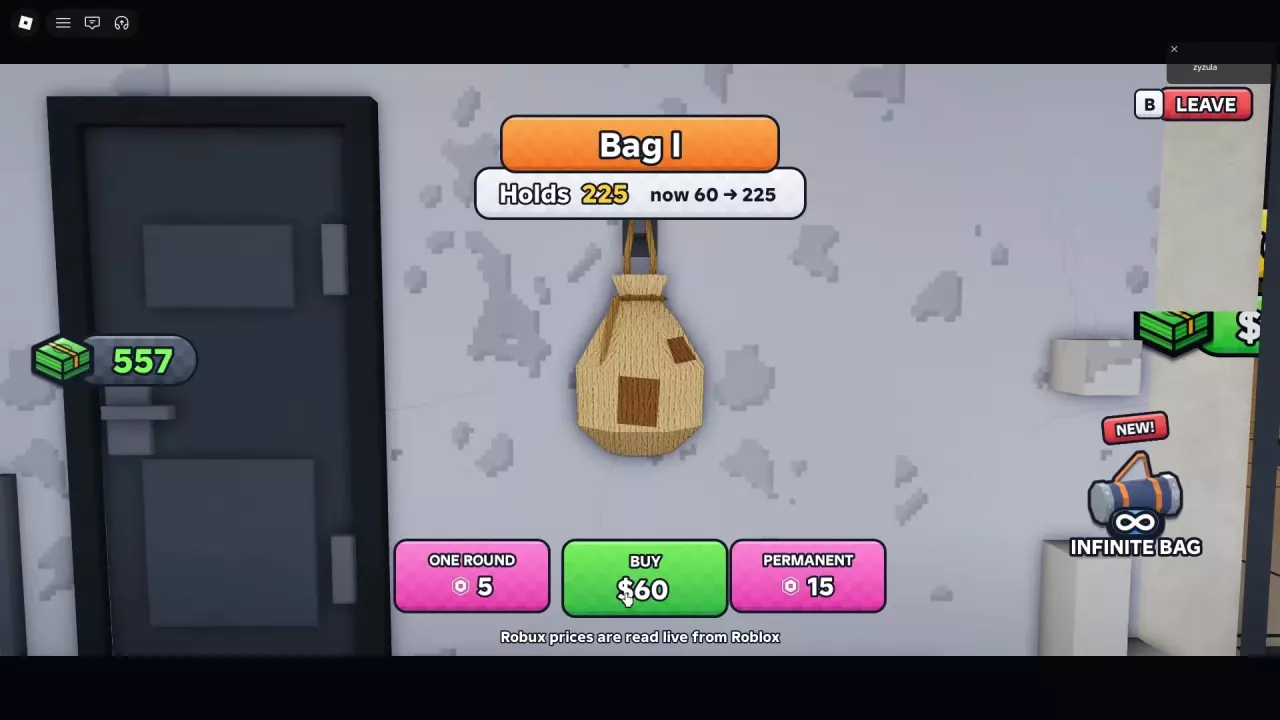
Bag I and Bag II in the room-clearing route
Approach the wall-mounted Bag Upgrade and press F. Choose the cash purchase, ONE ROUND, or an offered PERMANENT option according to how long you want the bag.
The Bag I cash purchase raises capacity from 60 to 225. The Bag II upgrade raises it from 225 to 600. Backpack levels and Bag I/II belong to different upgrade menus; match the offer to the menu you are using.
For the capacity progression and Infinite Bag choices, see bags and upgrade costs.
Why a Shop Offer Can Differ from a Forever Pass
| Pickaxe offer | Price | Purchase context |
|---|---|---|
| PERMANENT | 49 Robux | Five-wall Tool Shop menu |
| Pickaxe Forever | 199 Robux | Official pass that starts every Prison run with Pickaxe |
These are separate offers from different purchase entry points. The 49 Robux menu option is not a replacement price for the 199 Robux pass listing.
Likewise, the 49 Robux Jackhammer shelf offer, 79 Robux Mega Vacuum display offer, and 149 Robux Golden Hoover offer should not be treated as permanent purchases just because they cost Robux. Choose based on the duration and benefit attached to the offer, rather than transferring the terms of a similarly named Forever pass.
Compare the individual long-term benefits in the game pass prices and benefits guide.
Keep Forever Is a Separate Upgrade Offer
Infinite Bag – Keep Forever and Drill-Bot – Keep Forever are separate offers described as paying the difference for permanent access. Both are listed as not for sale.
- Infinite Bag – Keep Forever: Requires you to already have Infinite Bag for the current run. Its benefit is unlimited bag space in every run and every server, without further round purchases.
- Drill-Bot – Keep Forever: Provides a Drill-Bot that joins every run, prioritizes floating blocks, smashes walls, and gets stronger as you upgrade.
These upgrade offers are distinct from the regular Forever passes. Do not calculate an upgrade charge by subtracting a temporary purchase from a regular pass price. See the individual permanent offers for their benefits and sale status.
Purchase Prompts Do Not Pause the Warden Warning
The Security Room Belt purchase prompt costs 99 Robux, and the Warden countdown continues while it is open.
When the warning says the Warden is waking up, close the purchase prompt and leave the Warden's Office before the countdown ends. Deal with the purchase afterward; opening the prompt does not buy you extra time.
For the other room obstacles and warning responses, see room clearing and guard warnings.