
Punch Walls To Escape Upgrades: Stats, Costs, and Priorities
Last updated:
Spend cash on the part of your escape that slows you down. Punch Walls To Escape has different upgrade menus for the five-layer escape and room-clearing route, so match the attributes and prices to your current menu.
Quick Answer
Open UPGRADES and select your tool or Gear; in the room-clearing route, press Q for the Fists and Vacuum tabs. Prioritize breaking stats when walls take too long, Vacuum upgrades when rubble piles up, bag capacity when you fill up too often, and Crusher Speed when processing holds you back. Upgrade your Backpack before buying Turbo Vacuum. For an early room-clearing capacity upgrade, Bag I costs $60 and raises storage from 60 to 225.
Upgrade Types and Where to Find Them
| Route | Upgrade entrance | What you can improve |
|---|---|---|
| Five-layer escape | Right-side UPGRADES, then the tool tab | Tool Power, Speed, and Reach |
| Five-layer escape | UPGRADES → Gear | Walk Speed, Suction, Vacuum Reach, and Crusher Speed |
| Five-layer escape | Backpack on the Tool Shop rack; press E | Carrying capacity |
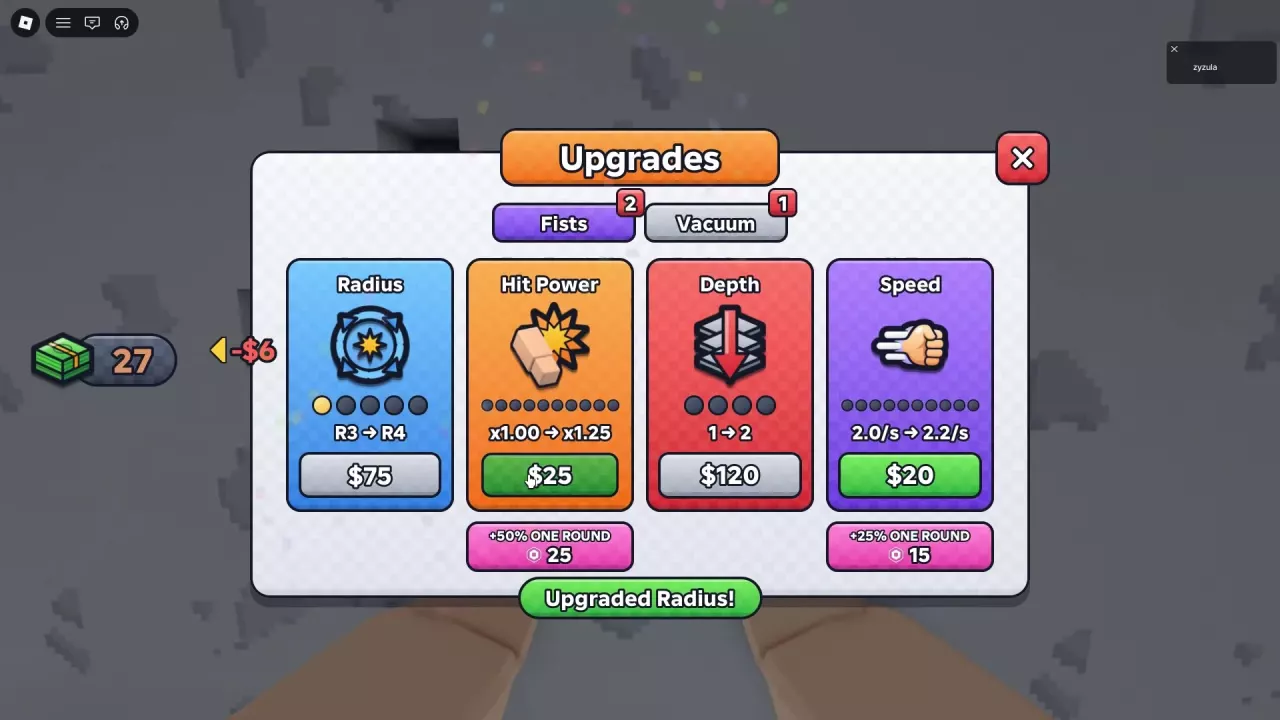
| Room clearing | Press Q or click UPGRADES → Fists | Radius, Hit Power, Depth, and Speed |
| Room clearing | UPGRADES → Vacuum | Reach, Suction, and Spread |
| Room clearing | Wall-mounted Bag Upgrade; press F | Bag capacity |
| Room clearing | Robots upgrade station; press F | Robot SPEED, CARRY, and number of robots |
For a tool upgrade, select its tab, compare the current and next values, then buy the attribute with cash. Return to the wall and equip the tool; in the room-clearing route, press 1 for Fists.
Choose the Upgrade That Removes Your Bottleneck
Our spending recommendation is to improve whichever stage makes you stop or wait most often:
| What slows you down | Recommended priority | Why it helps |
|---|---|---|
| Breaking the wall | Power or Hit Power, then coverage or attack speed as needed | Stronger hits address stubborn blocks; wider or deeper hits and faster attacks help clear more wall |
| Loose rubble piles up while you still have bag space | Vacuum Suction; Reach or Spread for collection coverage | Improves how quickly or broadly you collect |
| Your bag fills before you finish collecting | Bag capacity | Carries more rubble between deliveries |
| You spend too long waiting for the Crusher | Crusher Speed | Accelerates the processing stage |
| Your room-clearing team needs shared assistance | Robots upgrades | Their benefits apply to everyone |
For an early room-clearing run with limited storage, consider Bag I first: $60 increases capacity from 60 to 225. That is especially useful when frequent deliveries interrupt your punching and collection.
Before Turbo Vacuum, expand your Backpack. Its shop description gives it nearly twice the suction distance and more than twice the collection speed of the regular Vacuum. A small bag can turn that faster collection into more frequent selling trips. The five-layer Tool Shop offers Turbo Vacuum for $1,000, THIS RUN.
Fists Upgrades in the Room-Clearing Route
Press Q, then select Fists. Each attribute changes a different part of your punch:
- Radius: the area covered by a punch. Favor it when you need to clear a wider section of wall.
- Hit Power: the strength of each hit. Favor it when blocks resist your punches.
- Depth: how deeply a punch reaches into the wall.
- Speed: attacks per second. Higher values let you punch more frequently.
Fists cash upgrade costs
Each price below applies to the stated current-to-next value in the room-clearing menu.
| Attribute | Current → next value | Cash cost |
|---|---|---|
| Radius | R5 → R6 | $1,500 |
| Radius | R6 → R7 | $4,000 |
| Hit Power | x2.50 → x3.50 | $300 |
| Hit Power | x7.50 → x10.00 | $1,500 |
| Hit Power | x10.00 → x55.00 menu offer | $3,000 |
| Hit Power | x55 → x65 menu offer | $7,000 |
| Hit Power | x65 → x80 menu offer | $10,000 |
| Depth | 2 → 3 | $600 |
| Depth | 3 → 4 | $2,500 |
| Depth | 4 → 5 | $6,000 |
| Speed | 2.2 → 2.5 hits/s | $40 |
| Speed | 3.0 → 3.2 hits/s | $400 |
| Speed | 3.5 → 3.8 hits/s | $1,100 |
Radius maxes out at R7. That cap belongs to Radius, not the other Fists attributes. Match a purchase to its displayed starting value, particularly the Hit Power offers.
Power, Speed, and Reach in the Five-Layer Route
Open the right-side UPGRADES menu and select the tool you use. Power increases damage per hit, Speed improves attack frequency, and Reach improves the extent of a hit. For Fists, the Reach preview expresses that improvement as blocks hit per punch.
| Tool and attribute | Upgrade level | Current → next effect | Cash cost | Attribute level cap |
|---|---|---|---|---|
| Fists Power | 1 → 2 | 3.4 → 3.8 damage/hit | $40 | 5 |
| Fists Reach | 0 → 1 | 13 → 21 blocks/hit | $60 | 3 |
| Pickaxe Power | 2 → 3 | 11.2 → 12.4 damage/hit | $250 | 5 |
| Drill Power | 2 → 3 | 5 → 5.5 damage/hit | $600 | 5 |
For Fists, choose the $40 Power upgrade when individual blocks need stronger hits, or the $60 Reach upgrade when hitting more blocks at once is more useful. Pickaxe also has Reach upgrades.
Compare a tool's upgrade with its own current performance. Pickaxe's larger damage-per-hit number does not by itself make it better than Drill: Drill attacks continuously, and its shop description lists 7 hits per second. Attack method and frequency matter alongside damage. Use the tool prices and stage choices to decide which tool to buy before investing in its stats.
Collection, Capacity, and Processing Upgrades
Vacuum: distance, collection rate, and angle
In room clearing, open Q → Vacuum. Reach extends collection distance in studs, Suction increases the per-second collection rate, and Spread widens the collection angle in degrees.
At the menu state after Suction reaches 28/s, the offers are:
| Attribute | Current → next value | Cash cost |
|---|---|---|
| Reach | 18 → 20 studs | $60 |
| Suction | 28/s → 38/s | $250 |
| Spread | 24° → 27° | $30 |
Choose Suction for slow pickup, Reach for rubble farther away, or Spread for a wider collection area. In the five-layer route, use Gear → Suction and Vacuum Reach instead. See Vacuum choices and collection upgrades for equipment options.
Bags: more rubble per delivery
Capacity increases how much you can carry on each trip. The five-layer route uses Backpack upgrades at the Tool Shop; room clearing uses the wall-mounted Bag Upgrade. Follow the bag capacity and cost guide for each route's capacity progression and purchase options.
A bigger bag does not increase conveyor capacity. If the conveyor fills before accepting the whole load, rubble can remain in your bag.
Gear: movement and crushing
In the five-layer route, Walk Speed improves movement, while Crusher Speed accelerates rubble processing. Choose the latter when the Crusher's processing time is the delay you want to reduce. For selling interactions and delivery limits, see how to sell rubble and make money.
Robots: upgrades for the team
At the room-clearing Robots station, press F and choose SPEED, CARRY, or ROBOTS. These improve robot speed, carrying capacity, or count, and the upgrades help everyone. Consider them when your team needs shared assistance; use the Robots upgrade guide for the individual prices and repair interaction.
Cash Upgrades and One-Run Boosts
The room-clearing Fists menu has cash-priced stat upgrades and separate Robux boosts. Cash upgrades advance the displayed current stat to its next value. The paid boost buttons apply for one run:
| Paid boost | Effect | Price | Duration |
|---|---|---|---|
| Hit Power | +50% | 25 Robux | One run |
| Speed | +25% | 15 Robux | One run |
These buttons are separate purchases from the cash upgrades above. For equipment offers labeled THIS RUN, ONE ROUND, or PERMANENT, use the purchase duration guide. For choosing a room-clearing Perk, see the Perk effects and recommendations.